Never expose your API key in any public website's client-side code.
Appointment Booking API - Setster Developer Guide (2.0)
Master the process of integrating appointment booking using Setster's API. Detailed insights into endpoints, request formats, and best practices for efficient appointment handling.
Setster's scheduling platform employs a RESTful API that is easily deployed, secure, and highly scalable to meet enterprise needs.
You can schedule thousands of appointments, remotely manage all of their parameters, track all user activity and plug Setster within your business workflow. In layman's terms, with Setster, you can add massive scheduling capacity anywhere within your enterprise.
The first step to getting started using Setster to solve your complex scheduling needs is to create an account. The intuitive onboarding will walk you through adding all of the details about your business, locations, services, and staff that are a core component of developing your custom scheduling experience.
To use the Setster API, you will need the API key found within your Setster account. The Setster API works on HTTPS only.
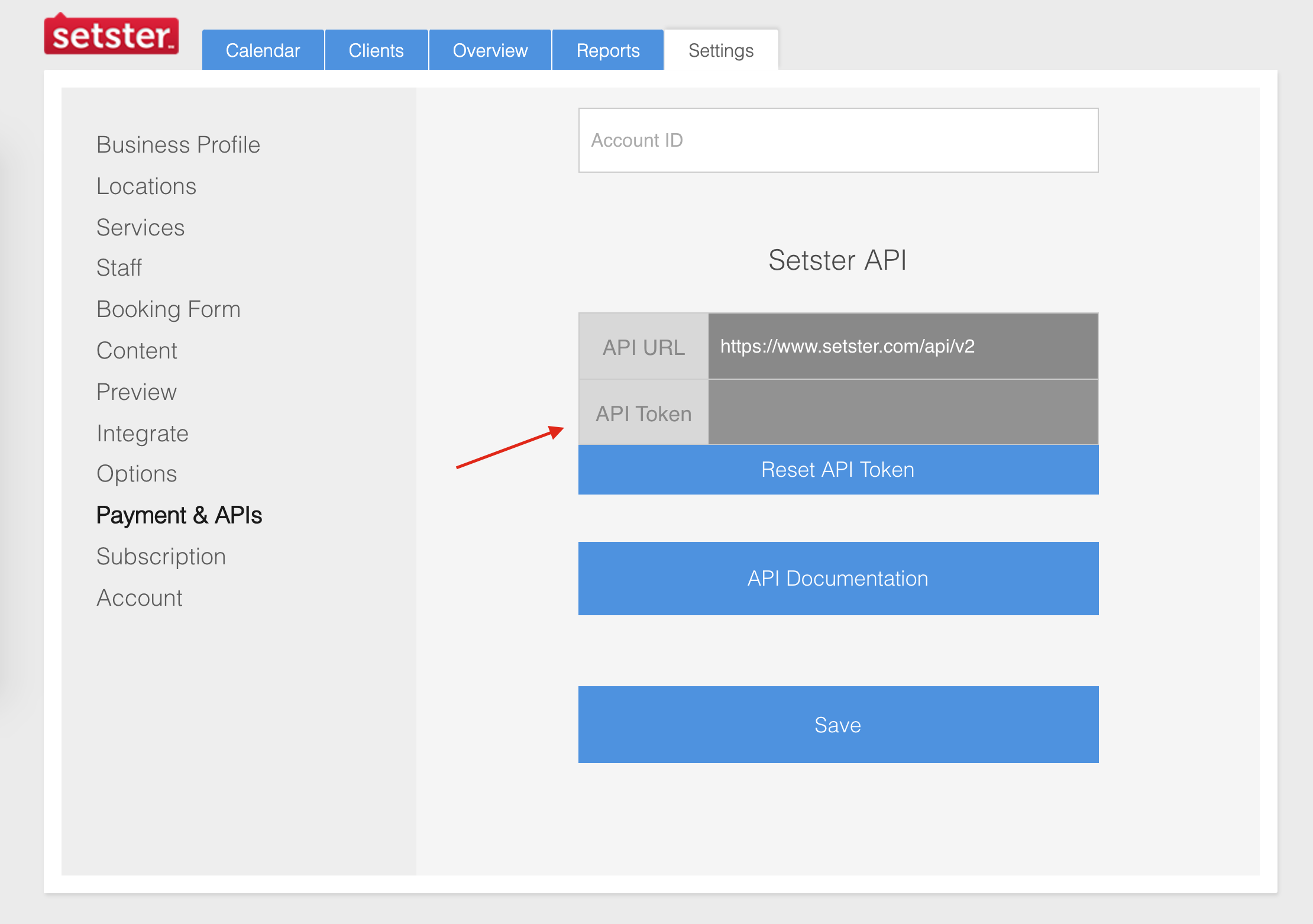
In this guide, we'll be using a Postman Collection to test out sending requests to the Setster API with a final goal of creating a new appointment.
Download and Import Collection To use the provided Postman Collection, you'll need to import it into your workspace. Detailed instructions on importing collections can be found at the official Postman docs here.
For the purpose of this getting started guide, we'll be working within the Basic Appointment Booking folder.
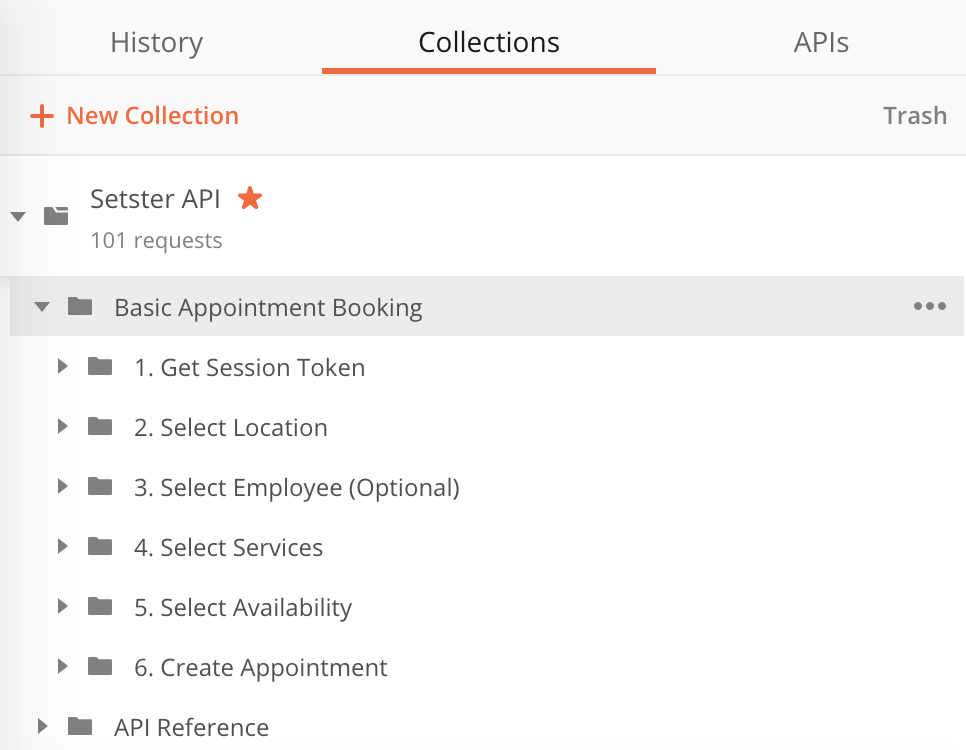
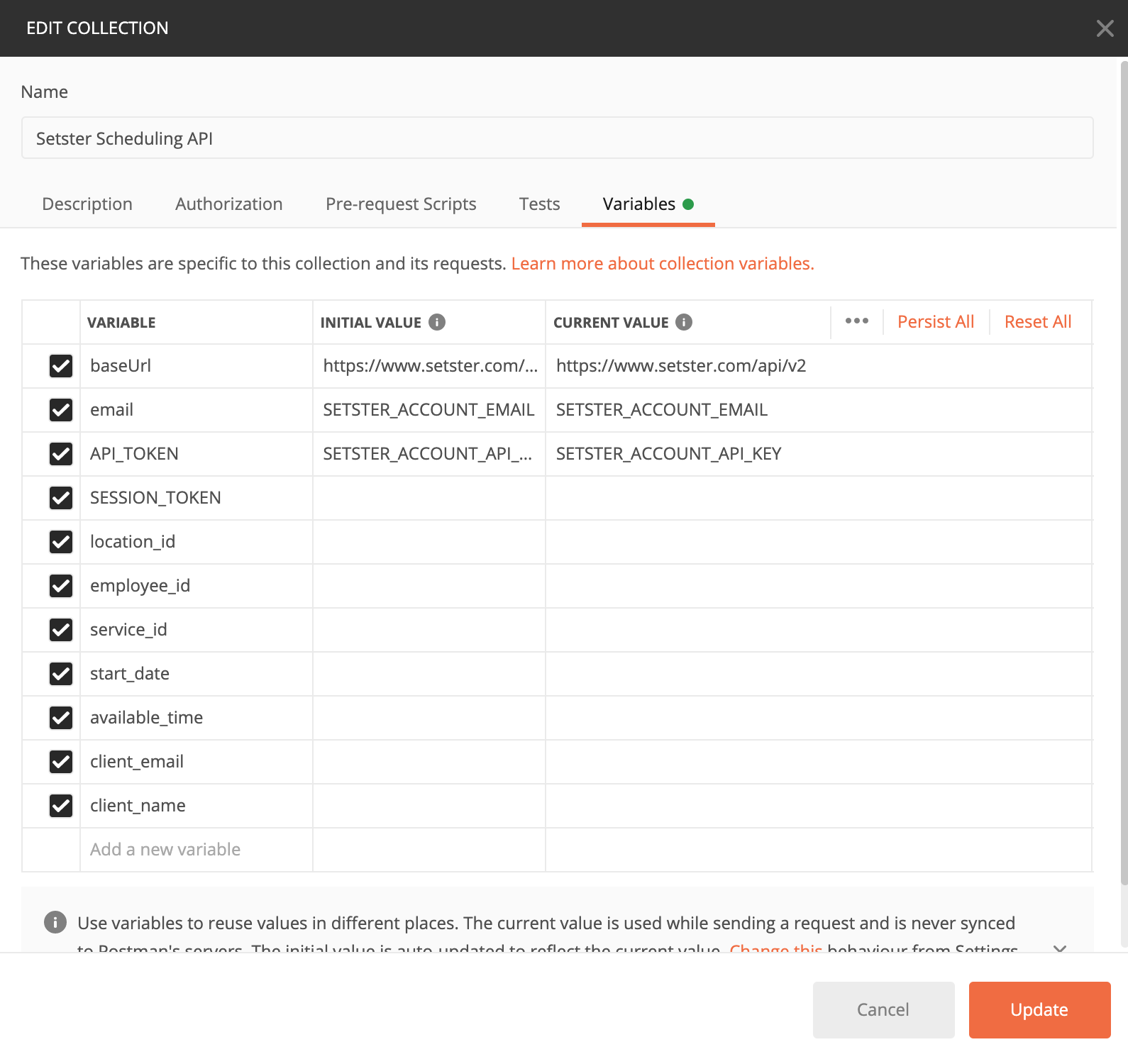
In this collection we'll be making use of Collection Variables to store data that we retrieve from a sequence of requests. To access and edit these variables edit the collection details and navigate to the variables section.
Authenticate your key to get your session token. We'll use the session_token property from this response to send to all future requests.
Using Postman
- Import the Postman Collection and locate the Basic Appointment Booking folder.
- Before making your first request, you'll need to update the
emailandAPI_TOKENcollection variables. - Open the Auth Get Session Token POST request from within the 1. Get Session Token folder
- Click the Send button to run the authentication POST request
- Your SESSION_TOKEN and company_id will automatically set in the collection variables after the initial authentication request.
- Open the collection variables to confirm the SESSION_TOKEN, and company_id values are now populated before moving forward.
Authenticate
The first step to using the Setster API is to authenticate. Authentication is done using your secret API Key and the account-owner email. In the returned response, the session_token should be used for all consecutive API calls. Please note the session, and the session_token expires periodically, and re-authentication will be required. We recommended you follow standard practices and develop an authentication methodology within your application to keep the connection open.
Session Token Refresh
When the session token expires, a 403 Forbidden response will be received, indicating the need for re-authentication and retrieval of a new token to maintain the connection. Instead of reauthenticating at regular intervals, it is advisable to perform this action as needed.
query Parameters
| email required | string <email> Account owner email address |
| token required | string API key |
| company_id required | integer <int64> Example: company_id=2345 The unique ID of the account. Account ID. |
Responses
Request samples
- curl
- Node
- Java
- Ruby
- C#
curl --location --request POST 'https://www.setster.com/api/v2/account/authenticate?session_token=SESSION_TOKEN&email=EMAIL&token=TOKEN'
Response samples
- 200
- 401
Content type
application/json
{- "statusCode": 0,
- "statusDescriptions": "OK",
- "data": {
- "user": {
- "id": 2343,
- "company_id": 2423,
- "account_type": 4,
- "enable_locations": true,
- "intuit_user_id": null,
- "nick_name": "demo-api",
- "is_owner": true,
- "enabled": true
}, - "session_token": "bl0l9e0g9t1lvul5fg635jre32"
}
}If the account has multiple locations, you'll need to retrieve them and select the one you'll book the appointment at. If the account has only one location, this step can be skipped, and the system will book the appointment within the single location.
List Locations
Get a list of all locations and their attributes.
Authorizations:
session_token
query Parameters
| company_id required | integer <int64> Example: company_id=2345 The unique ID of the account. Account ID. |
| id | integer Location ID |
| name | string |
| description | string |
| street1 | string |
| street2 | string |
| city | string |
| state | string |
| zip | string |
| phone | string |
string | |
| website | string |
| lat | number |
| lng | number |
| country | string |
| tags | string |
| photo | string |
| paypal_email | string |
| timezone_id | integer The timezone id |
| virtual | boolean |
| tmp_default | boolean |
| has_links | boolean |
| include_links | boolean |
Responses
Request samples
- curl
- Node
- Java
- Ruby
- C#
curl --location --request GET 'https://www.setster.com/api/v2/location?session_token=SESSION_TOKEN&id=ID&name=NAME&description=DESCRIPTION&street1=STREET1&street2=STREET2&city=CITY&state=STATE&zip=ZIP&phone=PHONE&email=EMAIL&website=WEBSITE&lat=LAT&lng=LNG&country=COUNTRY&tags=TAGS&photo=PHOTO&paypal_email=PAYPAL_EMAIL&timezone_id=TIMEZONE_ID&virtual=VIRTUAL&tmp_default=TMP_DEFAULT&has_links=HAS_LINKS&include_links=INCLUDE_LINKS'
Response samples
- 200
Content type
application/json
{- "statusCode": 0,
- "statusDescriptions": "OK",
- "data": [
- {
- "id": 12345,
- "name": "Spa center",
- "description": "",
- "company_id": 432,
- "is_main": false,
- "virtual": false,
- "street1": "13 Beverly",
- "street2": "",
- "city": "New York",
- "state": "NY",
- "zip": "10501",
- "country": "",
- "photo": "",
- "phone": "",
- "email": "user@example.com",
- "website": "",
- "tags": "",
- "paypal_email": "user@example.com",
- "timezone_id": 553,
- "lat": 0.1,
- "lng": 0.1,
- "ord": 0
}
]
}If the user experience requires a specific employee to be selected during the booking flow, use this call to get the list of available employees. This step is optional if the account only has one employee or a specific employee is not required to be selected. In that case, the appointment will be assigned to the appropriate employee based on a round-robin approach.
List Employees
Get a list of all employees and their attributes.
Authorizations:
session_token
query Parameters
| company_id required | integer <int64> Example: company_id=2345 The unique ID of the account. Account ID. |
| id | integer Employee id |
| statuses | string Value: "all" By default only active employees are returned. This filter allows to return all the employees, including the inactive ones |
| status | integer Enum: 0 1 |
| include_links | boolean |
string | |
| first_name | string |
| last_name | string |
| job | string |
| bio | string |
| phone | string |
| photo_url | string |
| public_email | boolean |
| public_phone | boolean |
| receivesms | boolean |
| sms_email | string |
| intuit_user_id | string |
| ipp_mode | integer |
| intuit_auth_id | string |
| intuit_realm_id | string |
| intuit_ticket_id | string |
| newsletter | boolean |
| is_owner | boolean |
| ics_service | string |
| ics_export_service | string |
| ics_url | string |
| ics_export_hash | string |
| google_export_canceled | boolean |
| google_export_add_pt | boolean |
| username | string |
| nickname | string |
string <uri> | |
| yelp | string <uri> |
string <uri> | |
| vimeo | string <uri> |
| youtube | string <uri> |
string <uri> | |
string <uri> |
Responses
Request samples
- curl
- Node
- Java
- Ruby
- C#
curl --location --request GET 'https://www.setster.com/api/v2/employee?session_token=SESSION_TOKEN&id=ID&statuses=STATUSES&status=STATUS&include_links=INCLUDE_LINKS&email=EMAIL&first_name=FIRST_NAME&last_name=LAST_NAME&job=JOB&bio=BIO&phone=PHONE&photo_url=PHOTO_URL&public_email=PUBLIC_EMAIL&public_phone=PUBLIC_PHONE&receivesms=RECEIVESMS&sms_email=SMS_EMAIL&intuit_user_id=INTUIT_USER_ID&ipp_mode=IPP_MODE&intuit_auth_id=INTUIT_AUTH_ID&intuit_realm_id=INTUIT_REALM_ID&intuit_ticket_id=INTUIT_TICKET_ID&newsletter=NEWSLETTER&is_owner=IS_OWNER&ics_service=ICS_SERVICE&ics_export_service=ICS_EXPORT_SERVICE&ics_url=ICS_URL&ics_export_hash=ICS_EXPORT_HASH&google_export_canceled=GOOGLE_EXPORT_CANCELED&google_export_add_pt=GOOGLE_EXPORT_ADD_PT&username=USERNAME&nickname=NICKNAME&linkedin=LINKEDIN&yelp=YELP&pinterest=PINTEREST&vimeo=VIMEO&youtube=YOUTUBE&twitter=TWITTER&facebook=FACEBOOK'
Response samples
- 200
Content type
application/json
{- "statusCode": 0,
- "statusDescriptions": "OK",
- "data": [
- {
- "id": 1234,
- "company_id": 3214,
- "email": "user@example.com",
- "first_name": "John",
- "last_name": "Doe",
- "job": "Accountant",
- "bio": "string",
- "phone": "",
- "photo_url": "",
- "public_email": false,
- "public_phone": false,
- "status": false,
- "username": "",
- "nickname": "",
- "linkedin": "",
- "twitter": "",
- "facebook": "",
- "receivesms": false,
- "sms_email": "number@txt.att.net",
- "intuit_user_id": "string",
- "ipp_mode": 0,
- "intuit_auth_id": "string",
- "intuit_db_id": "string",
- "intuit_realm_id": "string",
- "intuit_ticket_id": "string",
- "newsletter": 0,
- "is_owner": false,
- "ics_service": 0,
- "ics_export_service": 0,
- "ics_export_hash": "string",
- "google_export_canceled": 0,
- "google_export_add_pt": 0,
- "ord": 0,
- "ics_export_url": "string",
- "permissions": "locations, providers",
- "can_login": 1
}
]
}Each service record has a location_links property that defines the links between the service, the employees, and the locations. This is how the system determines which service is offered at what location and by whom.
This information is used when displaying a list of available locations, services, and employees to the user to select when booking an appointment. This parameter is also available for the employee entity.
List Services
Get a list of all services and their attributes.
Authorizations:
session_token
query Parameters
| company_id required | integer <int64> Example: company_id=2345 The unique ID of the account. Account ID. |
| id | integer Service id |
| location_id | integer Location id |
| active_services | boolean Default: false Return only active services |
| description | string |
| auto_confirm | boolean |
| is_subservice | boolean |
| duration | integer multiple of 15 |
| duration_padding | integer multiple of 5 |
| max_clients | integer |
| prior_notice | integer |
| after_notice | integer |
| cancel_appointment | integer |
| reschedule_appointment | integer |
| send_reminder | integer |
| start_step | integer multiple of 5 |
| set_schedule | integer |
| price | integer |
| payment_min_amount | number |
| allow_cash_payment | boolean |
| group_session | integer |
| waiting_list | integer |
| client_instructions | string |
| widget_message | string |
| password | string |
| active_from | string <date-time> |
| active_until | string <date-time> |
| active_interval_status | boolean |
| status | boolean |
| photo | string |
| active_rules | boolean |
| tmp_default | boolean |
Responses
Request samples
- curl
- Node
- Java
- Ruby
- C#
curl --location --request GET 'https://www.setster.com/api/v2/service?session_token=SESSION_TOKEN&id=ID&location_id=LOCATION_ID&active_services=ACTIVE_SERVICES&description=DESCRIPTION&auto_confirm=AUTO_CONFIRM&is_subservice=IS_SUBSERVICE&duration=DURATION&duration_padding=DURATION_PADDING&max_clients=MAX_CLIENTS&prior_notice=PRIOR_NOTICE&after_notice=AFTER_NOTICE&cancel_appointment=CANCEL_APPOINTMENT&reschedule_appointment=RESCHEDULE_APPOINTMENT&send_reminder=SEND_REMINDER&start_step=START_STEP&set_schedule=SET_SCHEDULE&price=PRICE&payment_min_amount=PAYMENT_MIN_AMOUNT&allow_cash_payment=ALLOW_CASH_PAYMENT&group_session=GROUP_SESSION&waiting_list=WAITING_LIST&client_instructions=CLIENT_INSTRUCTIONS&widget_message=WIDGET_MESSAGE&password=PASSWORD&active_from=ACTIVE_FROM&active_until=ACTIVE_UNTIL&active_interval_status=ACTIVE_INTERVAL_STATUS&status=STATUS&photo=PHOTO&active_rules=ACTIVE_RULES&tmp_default=TMP_DEFAULT'
Response samples
- 200
Content type
application/json
{- "statusCode": 0,
- "statusDescriptions": "OK",
- "data": [
- {
- "id": 1234,
- "name": "Default service",
- "company_id": 5678,
- "duration": 60,
- "description": "This service should be used in testing only",
- "auto_confirm": false,
- "is_subservice": false,
- "require_addon": 0,
- "duration_padding": 0,
- "max_clients": 0,
- "prior_notice": 0,
- "after_notice": 0,
- "cancel_appointment": 0,
- "reschedule_appointment": 0,
- "send_reminder": 0,
- "start_step": 0,
- "set_schedule": false,
- "schedule": [
- {
- "repeat": 1,
- "start_date": "01/06/2019",
- "start_time": {
- "hour": 9,
- "min": 0,
- "am": "am"
}, - "end_date": "01/12/2019",
- "end_time": {
- "hour": 5,
- "min": 0,
- "am": "pm"
}, - "days": {
- "2": 1,
- "3": 1,
- "4": 1,
- "5": 1,
- "6": 1
}
}
], - "price": 0,
- "payment_min_amount": 0,
- "allow_cash_payment": false,
- "group_session": 0,
- "waiting_list": 0,
- "client_instructions": "string",
- "widget_message": "string",
- "password": "string",
- "ord": 0,
- "created_at": "2019-08-24T14:15:22Z",
- "active_from": "2019-08-24",
- "active_until": "2019-08-24",
- "active_interval_status": true,
- "status": true,
- "active_rules": 1,
- "photo": "string"
}
]
}Get the availability for the selected location(optional), employee(optional), service, and day/week.
- If the location is not specified, then the default location for that company will be assigned.
- If the employee is not specified, then the pooled availability of all employees will be returned.
Get Availability
Get the available times to schedule an appointment.
query Parameters
| company_id required | integer <int64> Example: company_id=2345 The unique ID of the account. Account ID. |
| service_id required | integer <int64> Example: service_id=2116 The ID of the selected service |
| start_date required | string <date> Example: start_date=2014-05-15 (YYYY-mm-dd) The day for which the availability is requested |
| t required | string Enum: "daily" "weekly" Example: t=daily
|
| return required | string Enum: "boxes" "times" Example: return=boxes
|
| subservices | Array of integers Example: subservices=2116&subservices=231 The IDs of the selected subservices |
| location_id | integer <int64> Example: location_id=2116 The ID of the selected location |
| provider_id | integer <int64> Example: provider_id=2116 The ID of the provider (employee) |
| timezone_id | integer <int32> Example: timezone_id=553 The ID of the timezone relative to which the availability is calculated. Defaults to the location timezone. |
| first_available | boolean When there is no availability from start_date to the end of the interval(t - daily/weekly), whole agenda is scanned until a first available time slot is returned. |
| available_seats | boolean Retrieve available seats for an appointment start time. This will return the number of seats for an employee. If none is provided, a random employee will be selected and the number of seats for that employee will be returned. |
| total_seats | boolean Use this parameter to get the total number of seats for all employees |
| no_of_weeks | integer [ 1 .. 5 ] Example: no_of_weeks=4 Used to retreive the availability for one month. Accepted values are between 1 and 5 |
Responses
Request samples
- curl
- Node
- Java
- Ruby
- C#
curl --location --request GET 'https://www.setster.com/api/v2/availability?service_id=SERVICE_ID&subservices=SUBSERVICES&location_id=LOCATION_ID&provider_id=PROVIDER_ID&start_date=START_DATE&t=T&return=RETURN&timezone_id=TIMEZONE_ID&first_available=FIRST_AVAILABLE&available_seats=AVAILABLE_SEATS&total_seats=TOTAL_SEATS&no_of_weeks=NO_OF_WEEKS'
Response samples
- 200
Content type
application/json
{- "statusCode": 0,
- "statusDescriptions": "OK",
- "data": {
- "interval": 60,
- "boxInterval": 5,
- "padding": 0,
- "day": 15,
- "month": 8,
- "year": 2012,
- "times": [
- "09:00:00"
]
}
}Once you have all the above selected, you're ready to construct the request to create a new appointment. Setster requires the name and email address of the client at a minimum to save an appointment. You can optionally include additional information like phone, address, and other information that can be passed using Custom Fields.
Create an Appointment
Create a new appointment.
Timeslot Availability Errors
When creating an appointment, the API validates that the requested timeslot is available. If the timeslot is not available, the API returns statusCode: 9 (SLOT_NOT_AVAILABLE) with one of the following statusDescription messages:
| Message | Description |
|---|---|
Timeslot is not available |
General unavailability (e.g., outside business hours, employee not working, slot already booked) |
Timeslot is not available - time in the past |
The requested appointment time has already passed |
Timeslot is not available - prior notice X hours |
The appointment doesn't meet the minimum lead time requirement, where X is the configured prior notice in hours |
Validation Order
The availability checks occur in the following order:
- Time in the past check - Verifies the requested time hasn't already passed
- Prior notice check - Verifies the appointment meets the minimum lead time requirement configured in the service/widget settings
- Other availability checks - Verifies business hours, employee availability, and slot conflicts
Authorizations:
session_token
query Parameters
| company_id required | integer <int64> Example: company_id=2345 The unique ID of the account. Account ID. |
| validate_custom_fields | integer Default: 0 Enum: 0 1 Example: validate_custom_fields=1 When set to
When validation fails, the API returns an error with details about which fields failed validation. |
Request Body schema: application/json
| company_id required | integer <int64> Example: "3123" The ID of the company that the appointment belongs to. Field is writable when entity is owned by child account |
| client_email required | string <email> The email of the client that made the appointment |
| client_name required | string Example: "Test Client" The client name |
| service_id required | integer <int64> Example: "453" The ID of the service that the appointment is made for |
| start_date required | string Example: "2019-09-01 12:00" The date and time when the appointment is scheduled to start.
The time is local to the company timezone or the location timezone (if the location is in a different timezone).
The format of the date is |
| client_phone | string Example: "12345678" The client phone number |
| client_address | string The client address |
| employee_id | integer <int64> Example: "12412" The ID of the employee (provider) that the appointment is made for |
| location_id | integer <int64> Example: "54232" The ID of the location where the appointment will take place at |
| duration | integer <int32> multiple of 15 Default: 15 The duration of the appointment in minutes |
| note | string or null Custom client message |
| status | integer Enum: 0 1 2 3 4 6 8 9 10 11 12 13 Appointment status. Possible values:
|
| subservices | string IDs of sub services that were selected for the appointment separated by comma |
| paid | boolean Default: false Whether the appointment has been paid or not, if the service requires a payment. |
| price | integer Default: 0 |
| ews_id | string Deprecated Default: "" |
object Deprecated The values of the booking form fields filled by the client. Custom fields are tied to your Setster Booking Form. New custom data can be added by creating a new field in the Setster dashboard under Booking Form. | |
object Replaces the deprecated Custom data is tied to your Setster Booking Form. New custom data can be added by creating a new field in the Setster dashboard under Booking Form. Expects an object containing key values pairs where the | |
| timezone_id | integer <int32> Example: "553" The ID of the time zone in our database |
Responses
Request samples
- Payload
- curl
- Node
- Java
- Ruby
- C#
Content type
application/json
{- "company_id": 3123,
- "client_email": "user@example.com",
- "client_name": "Test Client",
- "client_phone": "12345678",
- "client_address": "string",
- "employee_id": 12412,
- "location_id": 54232,
- "service_id": 453,
- "start_date": "2019-09-01 12:00",
- "duration": 15,
- "note": "string",
- "status": 0,
- "subservices": "string",
- "paid": false,
- "price": 0,
- "ews_id": "",
- "custom_fields": {
- "field index1": [
- "string",
- "string",
- "string"
], - "field index2": [
- "string",
- "string",
- "string"
]
}, - "custom_data": {
- "key1": "Lorem Ipsum",
- "key2": "Lorem Ipsum"
}, - "timezone_id": 553
}Response samples
- 200
- 403
Content type
application/json
{- "statusCode": 0,
- "statusDescriptions": "OK",
- "data": {
- "id": 2342,
- "client_id": 23113,
- "company_id": 3123,
- "client_email": "user@example.com",
- "client_name": "Test Client",
- "client_phone": "12345678",
- "client_address": "string",
- "employee_id": 12412,
- "location_id": 54232,
- "service_id": 453,
- "start_date": "2019-09-01 12:00",
- "end_date": "2019-09-01 13:00",
- "length": 1800000,
- "duration_padding": 0,
- "note": "string",
- "status": 0,
- "type": "string",
- "subservices": "string",
- "paid": false,
- "price": 0,
- "ews_id": "",
- "custom_fields": {
- "field index1": [
- "string",
- "string",
- "string"
], - "field index2": [
- "string",
- "string",
- "string"
]
}, - "custom_data": {
- "key1": "Lorem Ipsum",
- "key2": "Lorem Ipsum"
}, - "timezone_short": "GMT -05:00",
- "timezone_offset_seconds": -18000,
- "timezone_id": 553
}
}